 Thai Clinic App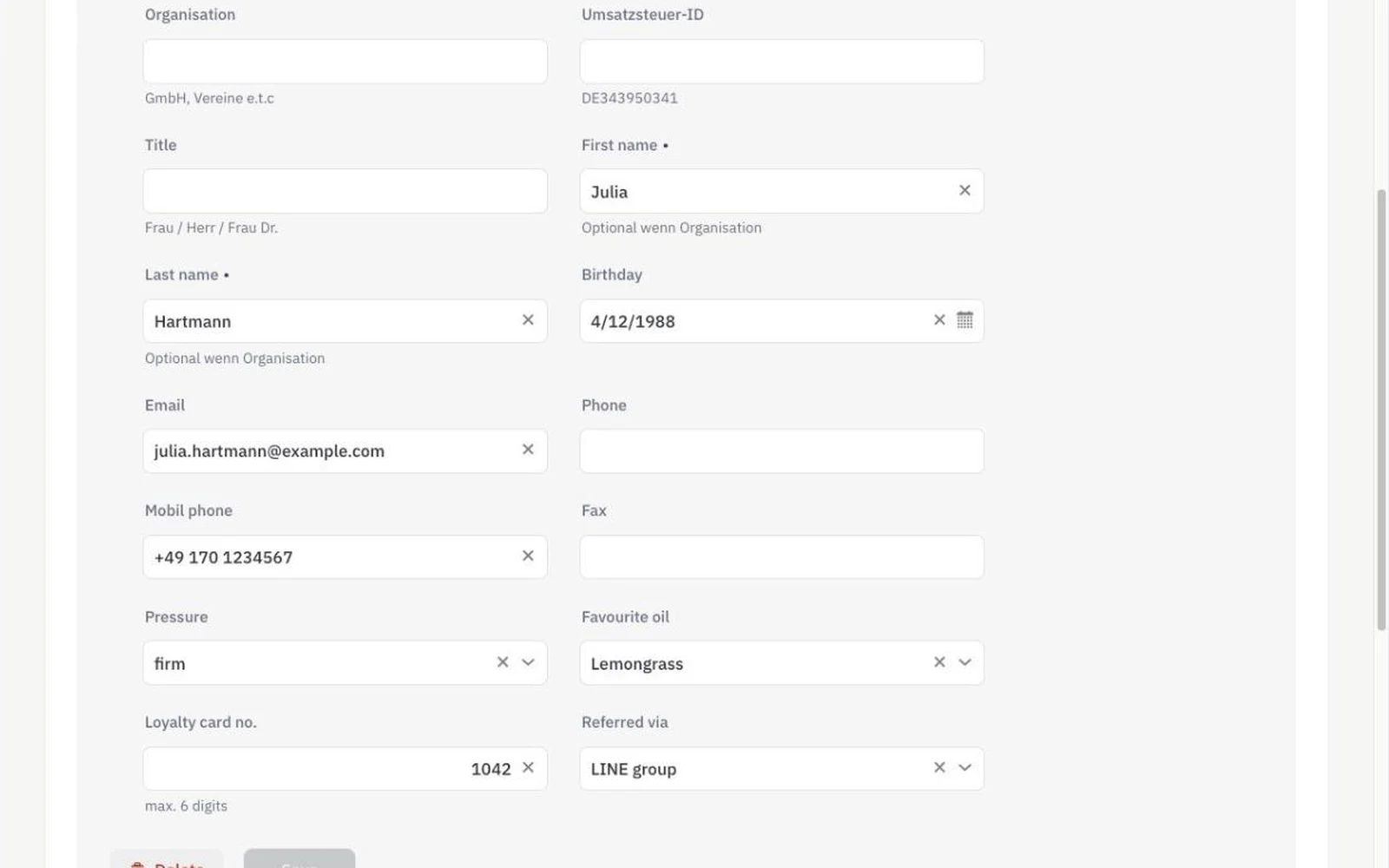
Custom fields let a Thai massage studio adapt the guest record and the other forms of its software to the way it actually works, without waiting for a developer. In Thai Clinic App a studio adds its own fields to guests, therapists, working hours, items, offers and notes — typed, optionally mandatory, with choices in its own words and its own language. The standard fields stay; the custom ones sit right next to them.
How it works
- Open “Customizing” and pick the area: guests (customers), therapists, working hours, items, offers (discount types) or notes.
- Give the field a name and a type — text, number, amount of money, date or a choice from values you define — and tick “mandatory” if nobody may skip it.
- From now on the field is part of that form for everyone in the studio, and a mandatory field is checked before saving.
- No longer needed? Switch it off. Its values stay, and switching it back on brings them back.
What you get
- Five field types: text, number, amount of money, date, choice
- Mandatory fields, checked before saving
- Field names and choices in Thai — or any language
- Money fields with their own currency: a purchase price in THB next to prices in EUR
- Switch off instead of delete: nothing is lost
- Included in every plan
Who it's for
- A studio with four therapists where every regular has a preferred pressure and oil — and the new colleague should know it on the first visit.
- A studio with three cabins that notes the cabin on every working-hours row, so the plan shows who works where.
- A studio that imports oils and balms from Thailand and keeps the purchase price in baht next to the selling price in euro.
An example from everyday use
A studio with four therapists adds “Pressure” (choice: gentle, medium, firm) and “Favourite oil” (choice) to its guests. On the third visit a regular is treated by a new colleague — and gets exactly the massage she always gets, because it was on the record. Later the studio adds “Referred via” (choice: LINE group, Facebook, walk-in, regular) and finally knows where its guests come from.
Custom fields are for your team: they appear in the forms therapists and the front desk fill in. Guests do not fill them in online, and they are not shown in lists or exports — that is where the feature stops today.
Frequently asked
Which field types are there?
Text with a maximum length, whole numbers with a maximum number of digits, amounts of money with their own currency, dates, and a choice from values you define. Each can be mandatory.
Can I name fields in Thai?
Yes. Field names and choices are free text in any language — Thai, German, English or mixed.
Can I make a field mandatory?
Yes. A mandatory field is checked before the record is saved — a new guest without the chosen pressure, say, cannot be stored.
What happens to the values when I remove a field?
Fields are switched off, not deleted. The stored values stay, disappear from the form, and come back when you switch the field on again.
Do my guests fill these fields in online?
No. Custom fields are for your team and appear in the staff forms. They are not part of online booking or the guest portal.
Does this cost extra?
No. Custom fields are included in every plan, for as many fields as you need.